
คิวการโทร
Fronta hovorů organizuje a směruje příchozí hovory, když jsou všichni agenti zaneprázdněni, a umísťuje volající do fronty v pořadí, v jakém volali. Tento systém pomáhá efektivněji spravovat velké objemy hovorů, zajišťuje spravedlivé rozdělení pracovní zátěže a poskytuje předvídatelnější zkušenost pro volající i agenty.
This document explains how to configure call queue settings and log into a queue from the NightPOS database.
ดูเพิ่มเติม
Přidání fronty
Chcete-li přidat frontu hovorů v Axivox, přejděte do konzole správy Axivox. V levé nabídce klikněte na Queues. Dále klikněte na Add a queue. Zde nastavte frontu hovorů.
Name: Název fronty hovorů. Povinné pole.
Internal Extension: Linka, na kterou mohou agenti přepojit volající. Povinné pole.
Strategy: Způsob směrování hovorů. Vyberte možnost, která nejlépe odpovídá potřebám společnosti pro tuto frontu hovorů:
Call all available agents: Hovor je odeslán všem agentům.
Calls the agent who has received the call for the longest time: Hovor je odeslán agentovi s nejdelším časem nečinnosti.
Calls the agent who has received the least call: Hovor je odeslán agentovi, který zpracoval nejméně hovorů v časovém okně.
Call a random agent: Hovor je odeslán náhodnému agentovi.
Call agents one after the other: Hovor je odeslán dalšímu agentovi v určeném pořadí. Toto pořadí je zapamatováno a neresetuje se po každém hovoru.
Call agents one after the other starting with the first in the list: การโทรจะถูกส่งไปยังเอเจนต์ถัดไปตามลำดับที่กำหนด ลำดับนี้จะถูกจดจำและลำดับจะไม่รีเซ็ตหลังจากการโทรแต่ละครั้ง
Maximum waiting time in seconds: ระยะเวลาที่ลูกค้าสามารถรอในคิวก่อนที่จะถูกส่งต่อไปยังกล่องข้อความเสียงหรือเอเจนต์เฉพาะ
Maximum duration of ringing at an agent: How long an individual agent's phone rings before the call gets moved onto the next step in the dial plan. Learn more about dial plans.
Static agents: Agents in the queue who receive calls without logging in.
Dynamic agents: Agents who must log into the queue to receive calls from it.
ดูเพิ่มเติม
Agent connection
Agents have three ways to join a call queue:
Static agents connect automatically.
Static agents are always signed into the call queue.
Manager logs in specific agents, via the Axivox management console.
Agent connects to the queue in NightPOS, via the VoIP widget.
Connect to the queue through Axivox
Once the call queue is set up and the changes are applied, a manager can log into the Axivox management console and connect dynamic agents to the queue manually.
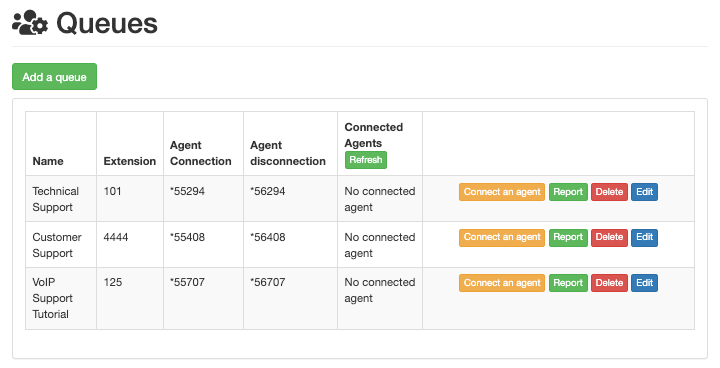
To connect an agent, click Queues, located in the left-hand menu. Doing so opens the Queues dashboard, with a few different columns listed:
Name: name of the queue.
Extension: number of the extension to be dialed to reach the queue.
Agent Connection: number to dial for dynamic agents to log into the queue.
Agent disconnection: number to dial for dynamic agents to log out of the queue.
Connected Agents: name of agents connected to the queue.
The following buttons are also available on the Queues dashboard:
เชื่อมต่อเจ้าหน้าที่: เชื่อมต่อเจ้าหน้าที่กับคิวด้วยตนเอง
รายงาน: สร้างรายงานของคิว
ลบ: ลบคิว
แก้ไข: เปลี่ยนแปลงการตั้งค่าของคิว
เมื่อเจ้าหน้าที่เชื่อมต่อกับคิว หรือกำลังสนทนากับลูกค้าอยู่ จะแสดงภายใต้คอลัมน์ เจ้าหน้าที่ที่เชื่อมต่อ
หากเป็นเจ้าหน้าที่แบบคงที่ จะแสดงว่าเชื่อมต่ออยู่**เสมอ**
เชื่อมต่อเจ้าหน้าที่โดยคลิกปุ่มสีส้มที่มีข้อความ เชื่อมต่อเจ้าหน้าที่ จากนั้นเลือกชื่อเจ้าหน้าที่ที่ต้องการจากเมนูแบบเลื่อนลง และคลิก เชื่อมต่อ
หากต้องการออกจากระบบเจ้าหน้าที่แบบไดนามิกจากคิวการโทรด้วยตนเอง ให้ไปที่ คอนโซลจัดการ Axivox และคลิก คิว จากเมนูด้านซ้าย จากนั้นคลิกปุ่มสีเขียว รีเฟรช ที่ด้านบนของคอลัมน์ เจ้าหน้าที่ที่เชื่อมต่อ จากจุดนี้ให้คลิกปุ่มสีแดง ยกเลิกการเชื่อมต่อ แล้วเจ้าหน้าที่จะถูกตัดการเชื่อมต่อทันที วิธีนี้มีประโยชน์ในสถานการณ์ที่เจ้าหน้าที่ลืมออกจากระบบเมื่อสิ้นสุดวัน
รายงาน
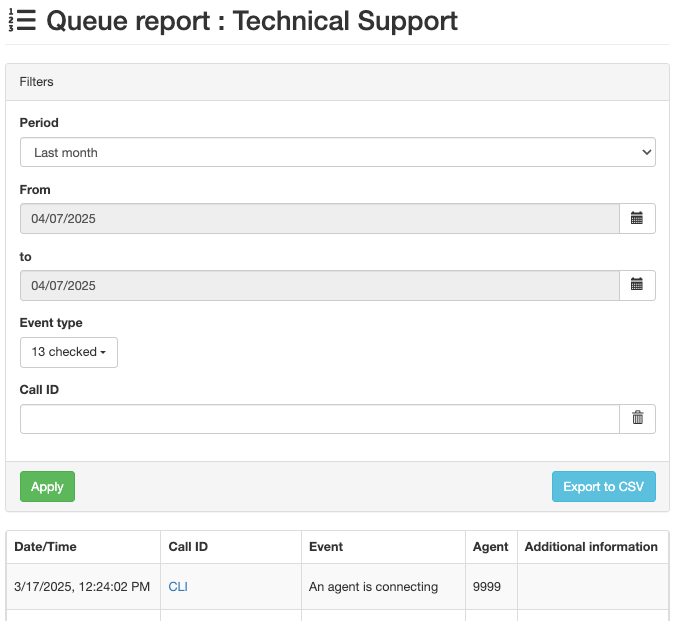
คลิก รายงาน เพื่อเปิดหน้า รายงานคิว ที่แสดงกิจกรรมของคิว รายงานนี้รวมถึงข้อมูลว่าใครเชื่อมต่อและเมื่อใด รวมถึงสายโทรศัพท์ใดที่ได้รับการจัดการโดยคิว ข้อมูลนี้แสดงบนหน้า รายงานคิว แยกต่างหาก
ตั้งค่าวันที่ของรายงานในฟิลด์ ระยะเวลา หากต้องการเลือกช่วงวันที่เฉพาะเจาะจง ให้ใช้ฟิลด์ จาก และ ถึง ข้อมูลสามารถจัดระเบียบตาม ประเภทอีเวนต์ (อธิบายด้านล่าง) และ รหัสการโทร
สร้างรายงานโดยคลิก นำไปใช้
รายงานแต่ละรายการสามารถส่งออกเป็นไฟล์ CSV เพื่อใช้และวิเคราะห์เพิ่มเติมผ่านปุ่ม ส่งออกเป็น CSV
เมื่อคลิกฟิลด์ ประเภทอีเวนต์ เมนูแบบเลื่อนลงจะปรากฏพร้อมตัวเลือกต่อไปนี้:
ผู้โทรออก
เจ้าหน้าที่กำลังเชื่อมต่อ
เจ้าหน้าที่กำลังยกเลิกการเชื่อมต่อ
การโทรถูกยุติ (เจ้าหน้าที่วางสาย)
การโทรถูกยุติ (ผู้โทรวางสาย)
ผู้โทรเชื่อมต่อกับเจ้าหน้าที่
มีผู้โทรเข้าสู่คิว
ผู้โทรออกจากคิว (ไม่มีเจ้าหน้าที่เชื่อมต่อ)
ผู้โทรออกจากคิว (หมดเวลา)
ไม่มีผู้รับสาย
ไม่มีผู้รับสาย ผู้โทรวางสาย
โอน
การโอนสายแบบตาบอด (เมื่อผู้โทรถูกโอนสายโดยไม่ได้โต้ตอบกับเจ้าหน้าที่)
สามารถเลือกตัวเลือกใดๆ หรือทั้งหมดจากสิบสามตัวเลือกได้จากเมนูแบบเลื่อนลง ประเภทอีเวนต์ การคลิก เลือกทั้งหมด จะเลือกตัวเลือกที่มีอยู่ทั้งหมดจากเมนูแบบเลื่อนลง และการคลิก ยกเลิกการเลือกทั้งหมด จะลบการเลือกทั้งหมดออกจากเมนูแบบเลื่อนลง
หากต้องการเลือก ประเภทอีเวนต์ แต่ละรายการ ให้คลิกที่ตัวเลือกที่ต้องการในเมนูแบบเลื่อนลง
Connect to queue on NightPOS
Dynamic agents can connect manually to the Axivox call queue from the NightPOS VoIP widget once the VoIP app is configured for the individual user in NightPOS.
To access the NightPOS VoIP widget, click the (VoIP) icon in the upper-right corner of the screen anywhere in an NightPOS database.
ดูเพิ่มเติม
เพื่อให้เจ้าหน้าที่เชื่อมต่อกับคิวการโทร ให้กดหมายเลข การเชื่อมต่อเจ้าหน้าที่ จากนั้นกดปุ่มโทรสีเขียว (โทรศัพท์) ในวิดเจ็ต VoIP จากนั้นเจ้าหน้าที่จะได้ยินข้อความสั้นๆ สองวินาทีที่บอกว่าเจ้าหน้าที่เข้าสู่ระบบแล้ว การโทรจะสิ้นสุดโดยอัตโนมัติ
หากต้องการดูเจ้าหน้าที่ที่เชื่อมต่ออยู่ในคิวการโทร ให้ไปที่ คอนโซลการจัดการ Axivox แล้วคลิก คิว จากเมนูด้านซ้าย
จากนั้นคลิกปุ่มสีเขียว รีเฟรช ที่ด้านบนของคอลัมน์ เจ้าหน้าที่ที่เชื่อมต่อ เจ้าหน้าที่ใดๆ ไม่ว่าจะเป็นแบบสแตติกหรือไดนามิก ที่เชื่อมต่อกับคิวในปัจจุบันจะปรากฏในคอลัมน์ถัดจากคิวที่พวกเขาเข้าสู่ระบบอยู่
To log out of the queue, open the NightPOS VoIP widget, dial the Agent disconnection number, and then press the green call button (phone) icon. The agent is disconnected from the queue after a short, two-second message.