
ปัญหาและวิธีแก้ไขการส่งอีเมลทั่วไป
หน้านี้แสดงรายการปัญหาการส่งอีเมลที่พบบ่อยที่สุดและวิธีแก้ไข
NightPOS is not an email provider
NightPOS does not function like a classic email inbox, such as Gmail, Outlook, Yahoo, etc.
While NightPOS uses emails as a way to notify and communicate with users/customers, it is, by design, not a replacement for a dedicated email server. Therefore, it might not behave in the expected way when compared to a traditional email inbox.
ความแตกต่างหลักๆ ต่อไปนี้:
ตามค่าเริ่มต้น เมื่อส่งอีเมลแจ้งเตือนหรืออีเมลธุรกรรม (ใบเสนอราคา ใบแจ้งหนี้ ข้อความตรงถึงผู้ติดต่อ) สำเร็จแล้ว วัตถุอีเมลนั้นจะถูกลบ เนื้อหาของข้อความอีเมลจะอยู่ในช่องแชทของบันทึกที่เกี่ยวข้อง ซึ่งจะป้องกันไม่ให้ฐานข้อมูลยุ่งเหยิงด้วยเนื้อหาสำเนาหลายฉบับของอีเมลเดียวกัน (เมื่อส่งไปยังผู้รับหลายราย) หากเนื้อหาดังกล่าวมีอยู่ในช่องแชทอยู่แล้ว
There is no concept of (blind) carbon copy ([B]CC). NightPOS uses the concept of followers added to a chatter to automatically decide when and how a contact is notified or receives a copy of an email.
Incoming emails are handled by checking if the TO email address is a valid email address in the NightPOS database or, in case of a reply email, if there is a reference in the email header that matches a message sent from the NightPOS database. All other emails will be bounced and not temporarily parked in a spam or quarantine folder. In other words, any email unrelated to an NightPOS database is lost.
อีเมลขาออก
การเปลี่ยนแปลงที่อยู่อีเมลของบัญชีผู้ใช้ผู้ดูแลระบบ
When an NightPOS database is created, the main admin account is assigned a placeholder email address. It is recommended to replace the admin email address with a valid email address to prevent outgoing email issues.
To do so, on the admin account, click the user icon, click My Profile (or
Preferences), and update the Email field found under the
Preferences tab. Either use any other email address or use your NightPOS subdomain (e.g.,
company-name.nightpos.com) and admin for the local-part (e.g., admin@company-name.nightpos.com).
การส่งมอบล้มเหลว
เมื่อส่งข้อความ ไอคอน (envelope) จะปรากฏขึ้นในช่องแชท ไอคอนจะเปลี่ยนเป็นสีแดงเมื่อการส่งล้มเหลวสำหรับผู้รับอย่างน้อยหนึ่งราย
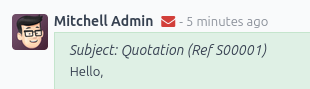
คลิกซ้ายที่ซองจดหมายเพื่อแสดงข้อมูลเกี่ยวกับการจัดส่ง และหากเป็นไปได้ ข้อความแสดงข้อผิดพลาดที่เกี่ยวข้อง :ref:` <email-issues-outgoing-delivery-failure-messages>`
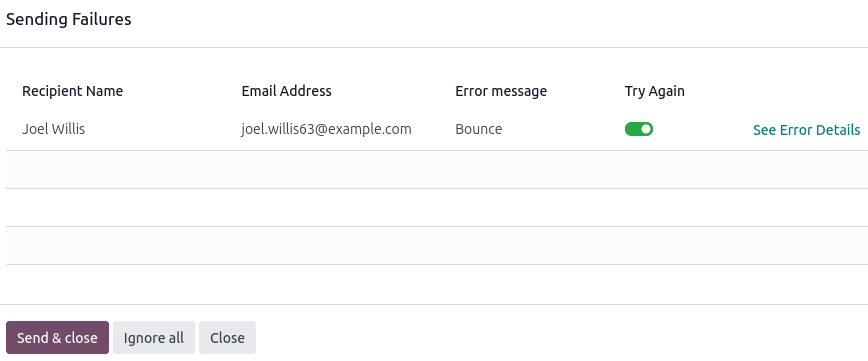
Click See Error Details to get extra information for the fail reason, if NightPOS was able to process the original error or bounce email.
คลิก ส่งและปิด เพื่อลองส่งอีเมลอีกครั้งไปยังผู้รับที่ toggled-on () ทั้งหมดภายใต้คอลัมน์ ลองอีกครั้ง ผู้รับที่ toggled-off () ทั้งหมดจะถูกละเว้น
คลิก ละเว้นทั้งหมด เพื่อละเว้นอีเมลที่ล้มเหลวทั้งหมดในปัจจุบันและเปลี่ยนไอคอนซองจดหมายจากสีแดงเป็นสีขาว
Unsent emails also appear in the NightPOS email queue. To access it, activate the developer mode and go to .
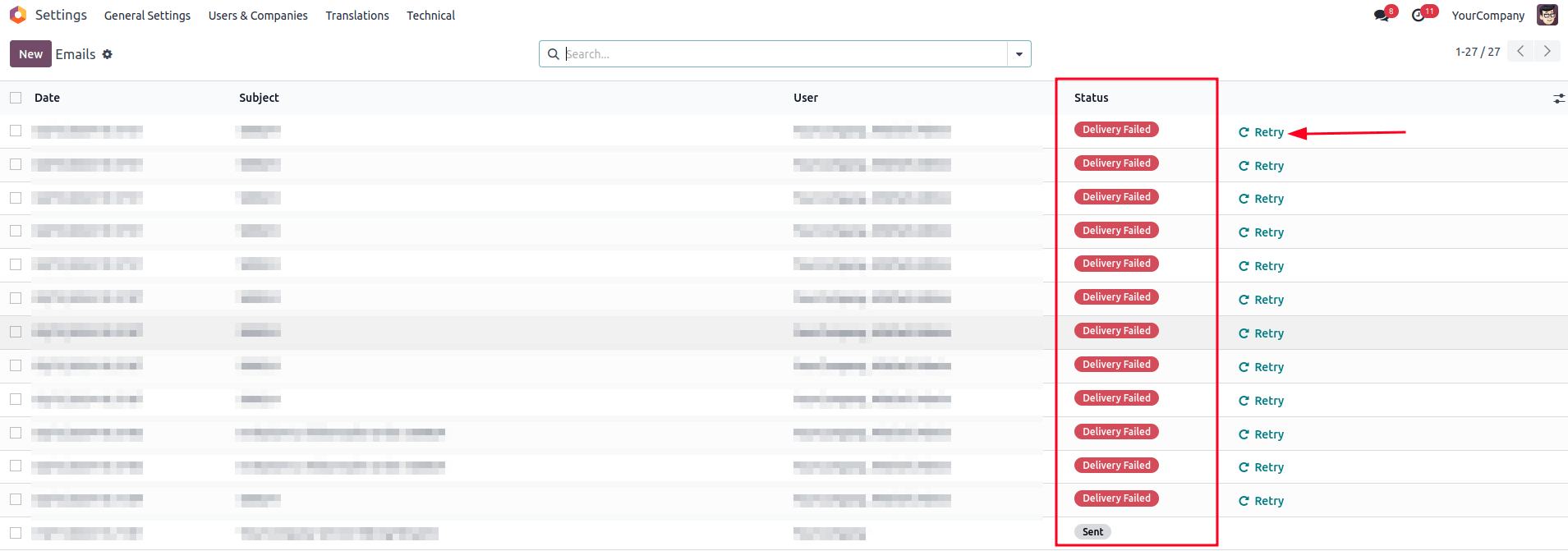
อีเมลที่ส่งล้มเหลวจะแสดงสถานะ การจัดส่งล้มเหลว คลิก ลองใหม่ เพื่อใส่อีเมลที่ส่งล้มเหลวลงในคิวอีเมลอีกครั้ง จากนั้นจะปรากฏสถานะ กำลังส่งออก อีเมลจะถูกส่งอีกครั้งในครั้งถัดไปที่ดำเนินการตามกำหนดการสำหรับคิวอีเมล
นอกจากนี้ ยังสามารถส่งอีเมลที่อยู่ในคิวได้ทันทีโดยคลิก ส่งทันที คลิก ยกเลิกอีเมล เพื่อลบออกจากคิวอีเมล
Note
Sent emails are periodically cleaned from the queue. This is controlled by the Auto-Vacuum scheduled action that cleans redundant data on your NightPOS database.
ข้อความแสดงข้อผิดพลาดทั่วไป
ถึงขีดจำกัดสำหรับวันนี้แล้ว

NightPOS limits the number of emails that can be sent from an NightPOS Online database. Most email service providers (e.g., Google, Yahoo, etc.) will blacklist NightPOS's server IP if NightPOS's email server is sending too many emails to addresses that do not exist or are no longer valid. It also applies to unsolicited spam emails sent through an NightPOS database.
ขีดจำกัดอีเมลรายวันเริ่มต้นจะอยู่ระหว่าง 5 ถึง 200 อีเมล ขีดจำกัดที่แน่นอนขึ้นอยู่กับหลายปัจจัย (อาจมีการเปลี่ยนแปลง)
ประเภทการสมัครฐานข้อมูล (ฟรี 1 แอป, ทดลองใช้งาน, สมัครสมาชิกแบบชำระเงิน)
แอปที่ติดตั้ง (เช่น อีเมลมาร์เก็ตติ้ง, Marketing Automation)
หากมีการโยกย้ายฐานข้อมูลอยู่
หากถึงขีดจำกัดรายวันแล้ว คุณสามารถ:
Contact NightPOS Support to increase your email quota. The following factors will be taken into account:
จำนวนผู้ใช้งานบนฐานข้อมูล
แอปที่ติดตั้งแล้ว
อัตราการตีกลับ (เปอร์เซ็นต์ของที่อยู่อีเมลที่ไม่ได้รับอีเมลเนื่องจากถูกส่งคืนโดยเซิร์ฟเวอร์อีเมลระหว่างทางไปยังผู้รับขั้นสุดท้าย)
ไม่ว่าชื่ออีเมล :ref:` ของคุณจะถูกตั้งค่าอย่างถูกต้องและใช้โดเมนที่กำหนดเองที่เหมาะสมหรือไม่ <email-outbound-alias-domain>`
Tip
When using a custom domain, verify that SPF, DKIM, and DMARC are correctly configured so that NightPOS's email servers are allowed to send emails on your custom domain's behalf.
Use an external outgoing email server to be independent of NightPOS's email limit.
รอจนถึงวันถัดไปแล้วลองส่งอีเมลอีกครั้ง โดยเปิดใช้งาน โหมดนักพัฒนา ไปที่ แล้วคลิก ลองอีกครั้ง ถัดจากอีเมลที่ยังไม่ได้ส่ง
Important
The daily email limit counts every email leaving your NightPOS database, triggered either manually or automatically. By default, any internal message, notification, logged note, etc., counts as an email if it notifies someone via email. This can be mitigated by receiving notifications in NightPOS instead of by email.
ข้อผิดพลาด SMTP
Simple Mail Transport Protocol (SMTP) คือมาตรฐานที่ใช้ในการส่งอีเมลระหว่างเซิร์ฟเวอร์อีเมลและ/หรือไคลเอนต์อีเมล
If you use an external STMP server to send emails, a standard set of SMTP error codes exists. While the code numbers are not specific to NightPOS, the exact content of the error message might vary from email server to email server.
Example
ข้อผิดพลาดการจัดส่ง SMTP ถาวร 550 จาก sendgrid.com:
Mail Delivery Failed
Mail delivery failed via SMTP server 'None'.
SMTPDataError: 550
The from address does not match a verified Sender Identity. Mail cannot be sent until this
error is resolved. Visit https://sendgrid.com/docs/for-developers/sending-email/sender-identity/
to see the Sender Identity requirements
ข้อความแสดงข้อผิดพลาดระบุว่าคุณพยายามส่งอีเมลจากที่อยู่อีเมลที่ยังไม่ได้ตรวจสอบ การตรวจสอบการกำหนดค่าเซิร์ฟเวอร์อีเมลขาออกหรือที่อยู่ จาก เริ่มต้นของฐานข้อมูลของคุณเป็นจุดเริ่มต้นที่ดีในการแก้ไขปัญหา และตรวจยืนยันว่าคุณได้เพิ่มที่อยู่อีเมลในรายการไวท์ลิสต์ที่ด้านข้างของ sendgrid.com แล้ว
โดยปกติแล้วการป้อนเนื้อหาข้อความแสดงข้อผิดพลาดในการค้นหา Google จะทำให้ได้ข้อมูลเกี่ยวกับสาเหตุหลักและวิธีแก้ไขปัญหานั้น
If the issue cannot be resolved and keeps occurring, contact NightPOS Support.
ไม่มีข้อผิดพลาดเกิดขึ้น
NightPOS is not always capable of providing information on the reason a delivery failed. The different email providers implement their own policy on bounced emails, and it is not always possible for NightPOS to interpret it correctly.
If there is a recurring problem with the same customer or the same domain, contact NightPOS Support.
Note
One of the most common reasons for an email failing to be sent with no error message is related to the SPF or DKIM configuration. Also, verify that the implemented email notification setup is adapted to your business needs. See the Communication in NightPOS by email documentation for more information.
ระยะเวลาการดำเนินการ
The exact time of an email is sent is handled by a system utility cron (scheduled action) that can be used to schedule tasks to run automatically at predetermined intervals. NightPOS uses this approach to send emails that are considered "not urgent" (i.e., newsletters formats such as mass mailing, marketing automation, and events). This avoids cluttering the mail servers and, instead, prioritizes individual communication.
A cron is an action that NightPOS runs in the background to execute particular code to complete a task. NightPOS also creates cron triggers in certain workflows that can trigger a scheduled action earlier than its scheduled date. Running a scheduled action manually or changing its frequency is generally not recommended, as it might create errors or break specific workflows.
By default, for the normal email queue, the Mail: Email Queue Manager cron runs every 60 minutes. The lowest running interval for a cron is 5 minutes. NightPOS recommends an interval of 15 minutes to ensure proper operation. If the interval is too short, not all emails may be processed, which may cause the cron to timeout.
อีเมลที่ถือว่าเร่งด่วน (จากบุคคลหนึ่งถึงบุคคลอื่น เช่น ใบสั่งขาย ใบแจ้งหนี้ ใบสั่งซื้อ ฯลฯ) จะถูกส่งทันที อีเมลเหล่านี้จะไม่ปรากฏภายใต้ เว้นแต่ว่าการจัดส่งจะล้มเหลว

แคมเปญอีเมลจะถูกส่งโดยเร็วที่สุด (หลังจากคลิกปุ่ม ส่ง) หรือในเวลาที่กำหนด (หลังจากคลิกปุ่ม กำหนดการ)
สำหรับคิวการตลาดทางอีเมล cron ของ การตลาดทางอีเมล: กระบวนการคิว จะทำงานวันละครั้ง แต่จะถูก เรียกใช้งานก่อนกำหนดโดยอัตโนมัติ หากมีการกำหนดเวลาแคมเปญนอกความถี่เริ่มต้นนี้ หากรายชื่อผู้รับจดหมายมีผู้รับกลุ่ม การเรียกใช้ cron ด้วยตนเองหลายครั้งเป็นสิ่งที่ ไม่แนะนำ เนื่องจากจะไม่ทำให้เวลาในการประมวลผลเร็วขึ้นและอาจทำให้เกิดข้อผิดพลาดได้
Tip
หากต้องการแก้ไข cron ให้เปิดใช้งาน โหมดนักพัฒนา และไปที่
ดูเพิ่มเติม
For more information about crons when using NightPOS.sh, check out NightPOS.sh frequent technical questions.
แคมเปญอีเมลมาร์เก็ตติ้งติดอยู่ในคิว
หากมีการวางแคมเปญการตลาดทางอีเมลหลายแคมเปญไว้ในคิว แคมเปญเหล่านั้นจะได้รับการประมวลผลตามลำดับเวลาโดยอิงตามวันที่สร้าง
Example
หากมีแคมเปญ 3 แคมเปญ ได้แก่ Campaign_1 (สร้างเมื่อวันที่ 1 มกราคม) Campaign_2 (สร้างเมื่อวันที่ 2 มกราคม) และ Campaign_3 (สร้างเมื่อวันที่ 3 มกราคม) แคมเปญเหล่านี้จะถูกวางไว้ในคิวโดยคลิก ส่ง สำหรับทั้งสามแคมเปญ
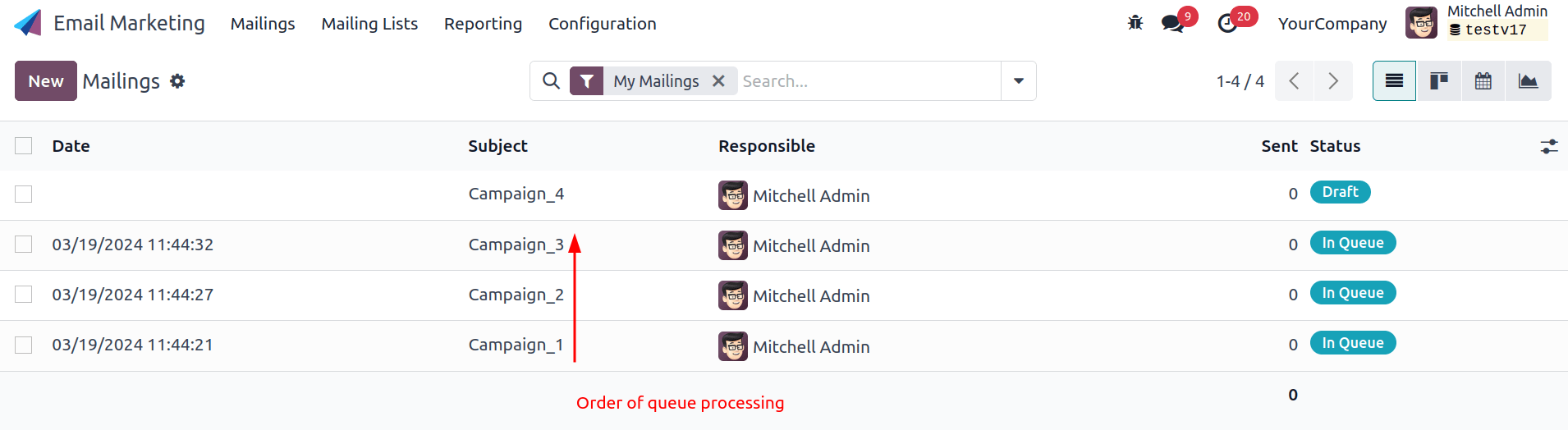
Cron จะพยายามประมวลผล Campaign_1 จากนั้นจึงประมวลผล Campaign_2 และสุดท้ายคือ Campaign_3 Cron จะไม่เริ่มประมวลผล Campaign_2 จนกว่าจะประมวลผล Campaign_1 เสร็จ
If an email campaign never leaves the queue, there might be an issue with the campaign at the top of the queue. To troubleshoot, we could remove Campaign_1 from the queue by clicking the Cancel button, and see if the two other campaigns are sent. Then we could try to fix Campaign_1 or contact NightPOS Support.
อีเมลขาเข้า
When there is an issue with incoming emails, there might not be an indication, per se, in NightPOS. It is the sending email client, who tries to contact a database, that will get a bounce message (most of the time a 550: mailbox unavailable error message).
ไม่ได้รับอีเมล
Contact NightPOS Support if there is a recurring issue with the same client or domain.
You can use database logs to understand and fix issues. Logs are a stored collection of all the tasks completed in a database. They are a text-only representation, complete with timestamps of every action taken on the NightPOS database. This can be helpful to track emails leaving the database. Sending failures can also be seen by logs when they indicate that the message tried to send repeatedly. Logs show every action to the email servers from the database.
Live logs are located in the ~/logs/ folder (accessed by the command line or on the
NightPOS.sh dashboard). Log files are created everyday at 5:00 AM (UTC).
Tip
The two most recent files, for the current day and the previous one, are named
nightpos.log and nightpos.log.1.
ไฟล์บันทึกสำหรับวันที่เก่ากว่าจะตั้งชื่อตามวันที่และถูกบีบอัด ใช้คำสั่ง grep และ zgrep (สำหรับไฟล์ที่ถูกบีบอัด) เพื่อค้นหาไฟล์
ดูเพิ่มเติม
For more information on logs and how to access them via the NightPOS.sh dashboard, refer to the NightPOS.sh logs documentation.
สำหรับข้อมูลเพิ่มเติมเกี่ยวกับการเข้าถึงบันทึกผ่านทางบรรทัดคำสั่ง โปรดดู เอกสารประกอบของนักพัฒนา
Information for NightPOS Support
Here is a list of helpful information to include when reaching out to NightPOS Support:
การส่งออกอีเมลฉบับเต็มจากกล่องจดหมายเข้า โดยปกติแล้วไฟล์เหล่านี้จะมีรูปแบบ
.emlหรือ.msgซึ่งมีข้อมูลทางเทคนิคที่จำเป็นสำหรับการตรวจสอบ กระบวนการที่แน่นอนในการดาวน์โหลดไฟล์จะขึ้นอยู่กับผู้ให้บริการอีเมลบุคคลที่สามของคุณดูเพิ่มเติม
เมื่อใช้ซอฟต์แวร์อีเมลภายในเครื่อง (เช่น Thunderbird, Apple Mail, Outlook เป็นต้น) เพื่อซิงโครไนซ์อีเมล โดยปกติแล้วจะสามารถส่งออกสำเนาอีเมลภายในเครื่องเป็นไฟล์ EML/MSG ได้ โปรดดูเอกสารประกอบของซอฟต์แวร์ที่ใช้สำหรับข้อมูลเพิ่มเติม
Tip
หากเป็นไปได้ ไฟล์ EML/MSG ควรอิงตามอีเมลต้นฉบับที่ส่งไปและล้มเหลวหรือทำให้เกิดปัญหา
สำหรับ อีเมลขาเข้า: หากเป็นไปได้ โปรดติดต่อผู้ส่งอีเมลเดิมและขอสำเนา EML/MSG ของอีเมลเดิม การส่งสำเนาอีเมลเดิม (ที่ส่งต่อ) จะมีข้อมูลบางส่วนที่เกี่ยวข้องกับการแก้ไขปัญหาเท่านั้น
สำหรับ อีเมลขาออก: ระบุ EML/MSG ของอีเมล หรือระบุระเบียนในฐานข้อมูลที่ได้รับผลกระทบ (เช่น หมายเลขใบสั่งขาย ชื่อผู้ติดต่อ หมายเลขใบแจ้งหนี้) และวันที่/เวลาที่ส่งอีเมล (เช่น อีเมลที่ส่งเมื่อวันที่ 10 มกราคม 2024 11:45 น. ตามเวลายุโรปกลาง)
An explanation of the exact flow that is being followed to normally receive those emails in NightPOS. Try to answer the following questions:
Is this a notification message from a reply being received in NightPOS?
Is this a message being sent from the NightPOS database?
มีการใช้เซิร์ฟเวอร์อีเมลขาเข้าหรือไม่ หรืออีเมลถูกส่งต่อ/เปลี่ยนเส้นทางผ่านเซิร์ฟเวอร์หรือผู้ให้บริการอีเมลที่กำหนดเองหรือไม่
มีตัวอย่างอีเมที่ได้รับการส่งต่ออย่างถูกต้องหรือไม่?
คุณได้เปลี่ยนการตั้งค่าที่เกี่ยวข้องกับอีเมลเมื่อเร็วๆ นี้หรือไม่ การตั้งค่าดังกล่าวหยุดทำงานหลังจากการเปลี่ยนแปลงดังกล่าวหรือไม่
คำตอบสำหรับคำถามต่อไปนี้:
เป็นปัญหาทั่วไปหรือเฉพาะกรณีการใช้งานหรือไม่ หากเฉพาะกรณีการใช้งานใดกรณีหนึ่ง อันไหนที่เป็นปัญหา?
Is it working as expected? In case the email is sent using NightPOS, the bounce email should reach the NightPOS database and display the red envelope.