ดรอปชิปไปยังผู้รับเหมาช่วง
In the Dropship to Subcontractor workflow, a company purchases the components of a product from a vendor, who delivers them directly to the subcontractor for manufacturing. The subcontractor then ships the finished product back to the company.
The following documentation covers how to configure a subcontracted product and walk through the Dropship to Subcontractor workflow.
Note
This document uses the term company to refer to the internal company requiring subcontracted goods, and the term subcontractor to refer to the external vendor handling the outsourced production of the subcontracted goods.
การกำหนดค่า
To use the Dropship to Subcontractor workflow, companies must first configure subcontracted products with a vendor pricelist and a subcontracting-type BoM specifying the product's components. Companies must then configure each component by specifying a dropship vendor and an appropriate route.
The pricelist allows the company to purchase the product from the vendor (subcontractor) through a PO. The BoM allows the product to be manufactured externally by the subcontractor. Routes are applied to each component in order to be properly sent from the dropshipping vendor to the subcontractor.
Important
In order to configure product components for dropshipping, make sure that the Dropshipping feature is enabled in the NightPOS settings.
To do so, navigate to either the Inventory or Purchase app, then click . Finally, in the Logistics section, enable the Dropshipping setting.
ตั้งค่าผู้จำหน่ายสินค้า
To configure a product's vendor for dropship subcontracting, navigate to , and select a product, or create a new one.
ในแบบฟอร์มสินค้า คลิกแท็บ การจัดซื้อ และเพิ่มผู้รับจ้างช่วงเป็นผู้ขายของสินค้าโดยคลิก เพิ่มบรรทัด เลือกผู้รับจ้างช่วงในเมนูแบบเลื่อนลง ผู้ขาย
Then, enter the price of the product in the Unit Price field.
Finally, set a Lead Time for the product in the corresponding field to specify the number of days for the subcontractor to receive components, produce the product, and deliver the finished good.
Note
Companies do not need to configure manufacturing lead times on a BoM. Instead, provide only a single Lead Time on the vendor pricelist, factoring in the duration for the subcontractor to receive the components from the dropship vendor, manufacture the product, and deliver the finished good back to the company.
กำหนดค่า BoM
หลังจากระบุผู้ขายแล้ว ให้กำหนดค่า BoM ประเภทรับจ้างช่วงสำหรับสินค้า ในการเริ่มต้น ให้คลิกปุ่มอัจฉริยะ Bill of Materials บนหน้าสินค้า จากนั้นเลือก BoM ที่ต้องการหรือสร้างใหม่
Tip
หรือไปที่ และเลือก BoM สำหรับสินค้าที่จ้างเหมาช่วง
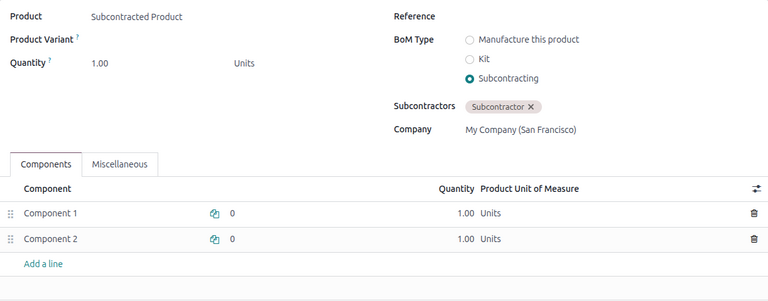
ในฟิลด์ ประเภท BoM เลือกตัวเลือก รับจ้างช่วง จากนั้นเพิ่มผู้รับจ้างช่วงหนึ่งรายขึ้นไปในฟิลด์ ผู้รับจ้างช่วง
สุดท้าย ตรวจสอบให้แน่ใจว่าระบุส่วนประกอบที่จำเป็นทั้งหมดในแท็บ ส่วนประกอบ แล้ว เมื่อต้องการเพิ่มส่วนประกอบใหม่ ให้คลิก เพิ่มรายการ เลือกส่วนประกอบในเมนูแบบเลื่อนลง ส่วนประกอบ และระบุปริมาณที่ต้องการในฟิลด์ ปริมาณ
กำหนดค่าส่วนประกอบ
When dropshipping to subcontractors, each component of a product must have a specified vendor and have the Dropship route enabled. This allows the components to be properly dropshipped from the vendor to the subcontractor.
หากต้องการระบุผู้จัดจำหน่ายของส่วนประกอบ ให้เลือกชื่อส่วนประกอบในแท็บ Components แล้วคลิกลูกศร (Internal link)
Tip
อีกทางหนึ่ง ไปที่ และเลือกส่วนประกอบ
ในฟอร์มสินค้าส่วนประกอบ คลิกแท็บ Purchase เพิ่มผู้จัดจำหน่ายโดยคลิก Add a line จากนั้นเลือกผู้จัดจำหน่ายในฟิลด์ Vendor
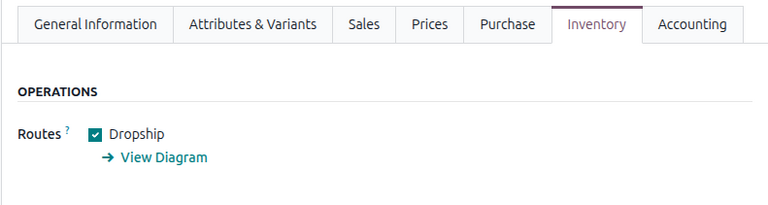
Next, to configure the route, click on the Inventory tab and select the Dropship route in the Routes section.
ทำซ้ำขั้นตอนนี้สำหรับทุกส่วนประกอบที่จะดรอปชิปไปยังผู้รับเหมาช่วง
เวิร์คโฟลว์
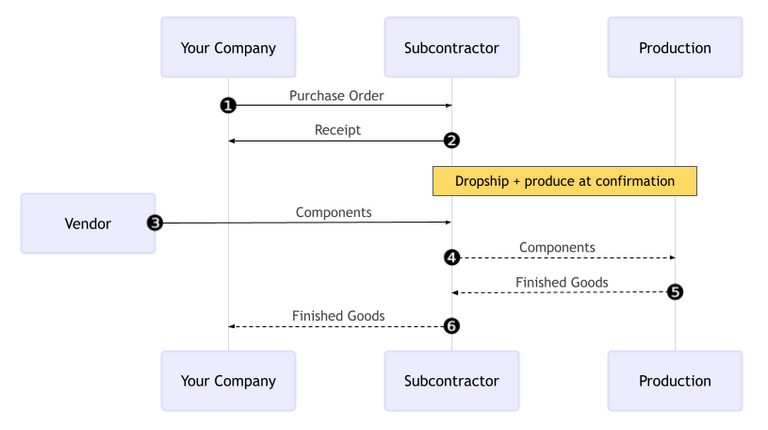
เวิร์กโฟลว์ Dropship to Subcontractor เริ่มต้นโดย การสร้าง PO เพื่อซื้อสินค้าจากผู้รับเหมาช่วง (1)
The company then confirms the subcontractor PO (2). This creates an RfQ to purchase the components from the vendor, as well as a receipt to transfer the final product.
Next, the company confirms the RfQ, turning it into a vendor PO and creating a dropship order to send the components from the vendor to the subcontractor (3). Once the company validates the dropship order, the subcontractor begins to manufacture the final product with the components and ships it to the company when done.
Once the product has been produced and received, the company validates the receipt (6) to trigger inventory moves from the subcontractor to the company's stock (4, 5).
สร้างและยืนยัน PO ผู้รับเหมาช่วง
ในการสร้าง|PO|สำหรับสินค้าที่รับช่วงการผลิต ให้ไปที่:menuselection:แอปการจัดซื้อ --> คำสั่งซื้อ --> ใบสั่งซื้อ และคลิก:guilabel:สร้าง
เริ่มกรอก|PO|โดยเลือกผู้รับเหมาช่วงจากเมนูแบบเลื่อนลง:guilabel:ผู้จำหน่าย ในแท็บ:guilabel:สินค้า ให้คลิก:guilabel:เพิ่มสินค้า`เพื่อสร้างรายการสินค้าใหม่ เลือกสินค้าที่รับช่วงการผลิตในฟิลด์:guilabel:`สินค้า และป้อนจำนวนในฟิลด์:guilabel:จำนวน
After adding the product, the Expected Arrival field is updated with the finished product's expected delivery date, as configured earlier with the vendor's Lead Time.
สุดท้าย คลิก Confirm Order เพื่อยืนยัน PO ใบรับจะถูกสร้างโดยอัตโนมัติ และปุ่มอัจฉริยะ Receipt จะปรากฏที่ด้านบนของฟอร์ม นอกจากนี้ RfQ แยกต่างหากจะถูกสร้างโดยอัตโนมัติเพื่อซื้อส่วนประกอบจากผู้จัดจำหน่ายดรอปชิป
Note
This RfQ is not automatically linked to the PO. It must be accessed separately on the Requests for Quotation page.
ยืนยัน RfQ ของผู้ขาย
หากต้องการยืนยัน RfQ ผู้จัดจำหน่าย ให้ไปที่ เลือก RfQ ที่สร้างขึ้นใหม่สำหรับผู้จัดจำหน่ายที่เหมาะสม
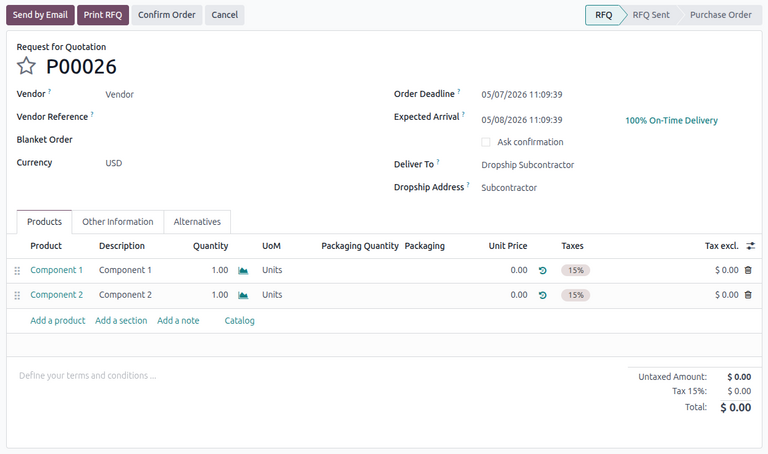
ใน RfQ ฟิลด์ ส่งไปที่ จะแสดง ดรอปชิปผู้รับเหมาช่วง และฟิลด์ ที่อยู่สำหรับดรอปชิป จะแสดงชื่อของผู้รับเหมาช่วงที่ส่งส่วนประกอบแบบดรอปชิปไปให้
คลิก Confirm Order เพื่อยืนยันการซื้อส่วนประกอบจากผู้จัดจำหน่าย การดำเนินการนี้จะเปลี่ยน RfQ เป็น PO ผู้จัดจำหน่าย ปุ่มอัจฉริยะ Dropship จะปรากฏที่ด้านบนของ PO ผู้จัดจำหน่าย
Note
ในเวลาเดียวกัน ปุ่มอัจฉริยะ Resupply จะปรากฏที่ด้านบนของ PO ผู้รับเหมาช่วง ที่สร้างไว้ก่อนหน้านี้ ในการรับเหมาช่วงแบบดรอปชิป ปุ่มอัจฉริยะนี้จะเชื่อมโยงไปยังคำสั่งดรอปชิป
ยืนยันคำสั่งซื้อ dropship
เมื่อส่งชิ้นส่วนไปยังผู้รับเหมาช่วงโดยผู้จำหน่ายแบบ dropship แล้ว ให้คลิกปุ่มสมาร์ท Dropship บน PO ของผู้จำหน่ายเพื่อเปิดใบสั่งซื้อ dropship
Note
ใบสั่งซื้อ dropship สามารถเปิดได้จาก PO ของ*ผู้รับเหมาช่วง* เช่นกัน ไปที่ เลือก PO จากนั้นคลิกปุ่มสมาร์ท Resupply
สุดท้าย คลิกปุ่ม ตรวจสอบ ที่ด้านบนเพื่อยืนยันว่าผู้รับเหมาช่วงได้รับชิ้นส่วนแล้ว จากนั้นผู้รับเหมาช่วงจะเริ่มการผลิตสินค้าขั้นสุดท้าย
ขั้นตอนการได้รับเอกสาร
After the subcontractor completes production, the finished product is shipped to the company.
เพื่อรับสินค้าเข้าสต็อก ไปที่ และเลือก PO ของ*ผู้รับเหมาช่วง*
ที่ด้านบนของ PO คลิกปุ่ม รับสินค้า หรือคลิกปุ่มสมาร์ท ใบรับ จากนั้นคลิก ตรวจสอบ เพื่อบันทึกการจัดส่งขาเข้าในคลังสินค้า
Note
หากเปิดใช้งาน ขั้นตอนการจัดการคลังสินค้าแบบหลายขั้นตอน จะต้องมีการตรวจสอบการโอนย้ายเพิ่มเติมเพื่อบันทึกสินค้าเข้าสู่คลัง
ติดตามการเคลื่อนไหวสินค้าในคลัง
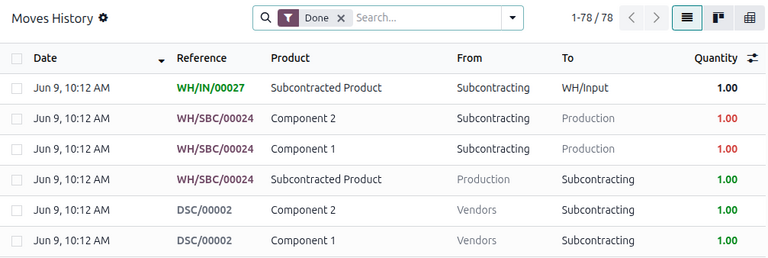
After validating a receipt, NightPOS automatically generates inventory moves to track the movement of subcontracted products between locations. To view these inventory moves, navigate to .
In the Dropship to Subcontractor workflow, product components are first sent from the vendors to a dedicated location called Subcontracting. Another location called Production then consumes the components and produces the finished good. Once produced, the good then moves back to the Subcontracting location before finally entering the contractor's stock when the receipt is validated.