การยืนยันหมายเลข VAT (VIES)
ระบบแลกเปลี่ยนข้อมูลภาษีมูลค่าเพิ่ม หรือ VIES เป็นเครื่องมือที่จัดทำโดยคณะกรรมาธิการสหภาพยุโรปที่ช่วยให้คุณสามารถตรวจสอบ ความถูกต้องของหมายเลข VAT สำหรับบริษัทที่จดทะเบียนในสหภาพยุโรป
NightPOS's VAT Validation feature uses the VIES to verify your contacts' VAT numbers directly from NightPOS's interface.
Note
Regardless of whether or not the Verify VAT Numbers feature is enabled, NightPOS checks the format of a contact's VAT against the expected format of VAT numbers from that country.
การยืนยันหมายเลข VIES VAT
หากต้องการเปิดใช้งานฟีเจอร์นี้ ให้ไปที่ ในส่วน ภาษี ให้เปิดใช้งานฟีเจอร์ ตรวจสอบหมายเลขภาษีมูลค่าเพิ่ม และคลิกที่ บันทึก
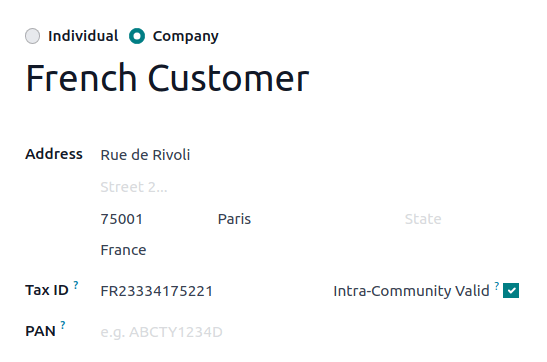
Once the Verify VAT Numbers feature is enabled, if the contact's Tax ID field is populated and its country is different from your company's country, NightPOS displays an Intra-Community Valid checkbox. NightPOS tests the VAT number through the VIES and automatically checks or unchecks the Intra-Community Valid checkbox depending on the validity of the VAT number.
Important
คุณสามารถแทนที่ฟิลด์ ภายในชุมชนที่ถูกต้อง บนผู้ติดต่อได้ด้วยตนเอง ในกรณีที่การตรวจสอบ VIES อัตโนมัติไม่ถูกต้อง (ตัวอย่างเช่น หากบริษัทเพิ่งสร้างขึ้นและ VAT ยังไม่อยู่ใน VIES) การเปลี่ยนแปลงนี้ถูกบันทึกไว้ในการแชทเพื่อความโปร่งใส
Note
NightPOS can automatically apply fiscal positions. If the Verify VAT Numbers feature is enabled, any fiscal positions with VAT required enabled will require Intra-Community valid VAT numbers to apply automatically.