บัญชีโซเชียลมีเดีย
In order to create social posts and analyze content with NightPOS Social Marketing, social media accounts must be added as a stream on the application's main dashboard.
Note
Be aware that personal profiles cannot be added as a stream. The main use of NightPOS Social Marketing is to manage and analyze business accounts on social media platforms.
Warning
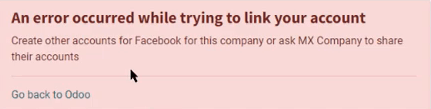
NightPOS Social Marketing has some limitations in regards to social media accounts. For example, NightPOS cannot handle a large quantity of various pages (e.g. ~40 pages) under the same company. The same limitations are present in a multi-company environment because of how the API is constructed.
Warning
ในสภาพแวดล้อมหลายบริษัท หากทุกบริษัทไม่เปิดใช้งานเพจพร้อมกัน จะส่งผลให้เกิดข้อผิดพลาดเรื่องสิทธิ์
For example, if Company 1 is the only company selected from the main NightPOS dashboard, and activates Facebook Page 1 and Facebook Page 2, then those pages will be accesible on the Social Marketing dashboard.
อย่างไรก็ตาม หากในฐานข้อมูลเดียวกัน ผู้ใช้เพิ่มบริษัท 2 จากเมนูแบบเลื่อนลงของบริษัทในส่วนหัว และพยายามเพิ่มสตรีมเดียวกัน จะส่งผลให้เกิดข้อผิดพลาดเรื่องสิทธิ์
สตรีมโซเชียลมีเดีย
ในการเพิ่มบัญชีธุรกิจโซเชียลมีเดียเป็นสตรีม ให้ไปที่ และเลือกปุ่ม เพิ่มสตรีม ที่อยู่ในมุมซ้ายบน การดำเนินการนี้จะแสดงหน้าต่างป๊อปอัป เพิ่มสตรีม
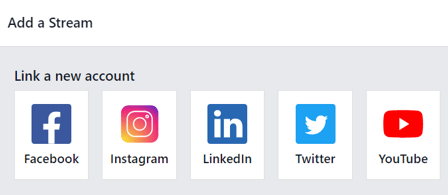
ในหน้าต่างป๊อปอัป เพิ่มสตรีม ให้เลือก เชื่อมโยงบัญชีใหม่ สำหรับธุรกิจจากแพลตฟอร์มโซเชียลมีเดียยอดนิยมใด ๆ ต่อไปนี้: Facebook, Instagram, LinkedIn, Twitter และ YouTube
After clicking the desired social media outlet from the Add a Stream pop-up window, NightPOS navigates directly to that specific social media outlet's authorization page, where permission must be granted, in order for NightPOS to add that particular social media account as a stream to the Social Marketing application.
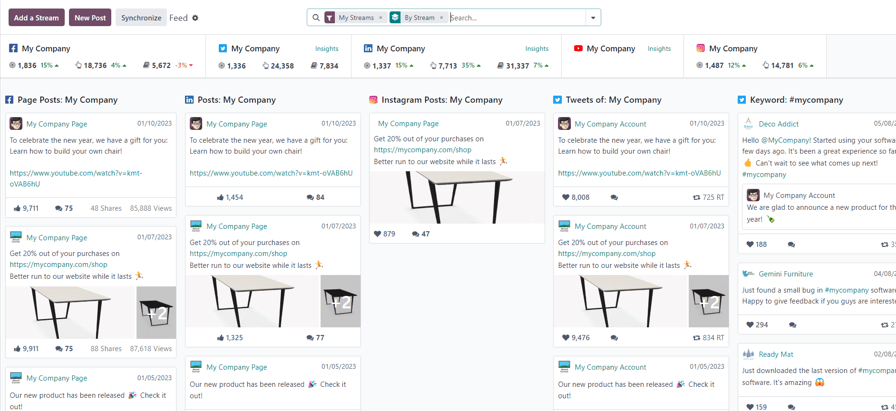
Once permission is granted, NightPOS navigates back to the Feed on the main Social Marketing dashboard, and a new column, with that account's posts, is added. Accounts/streams can be added at any time.
Important
สามารถเพิ่มเพจ:guilabel:`Facebook`ได้ตราบใดที่บัญชี:guilabel:`Facebook`ที่ให้สิทธิ์เป็นผู้ดูแลระบบของเพจนั้น นอกจากนี้ควรสังเกตว่าสามารถเพิ่มเพจที่แตกต่างกันสำหรับสตรีมที่แตกต่างกันได้
Note
Instagram accounts are added through a Facebook login because it uses the same API. This means, an Instagram account needs to be linked to a Facebook account in order for it to show up as a stream in NightPOS.
เพจโซเชียลมีเดีย
Another way to quickly link social media accounts to NightPOS Social Marketing can be done on the Social Media page. To access the Social Media page, navigate to .
บนเพจ:guilabel:Social Media`มีตัวเลือกโซเชียลมีเดียทั้งหมด โดยแต่ละตัวเลือกมีปุ่ม:guilabel:`Link account: Facebook, Instagram, LinkedIn, Twitter, YouTube และ:guilabel:Push Notifications
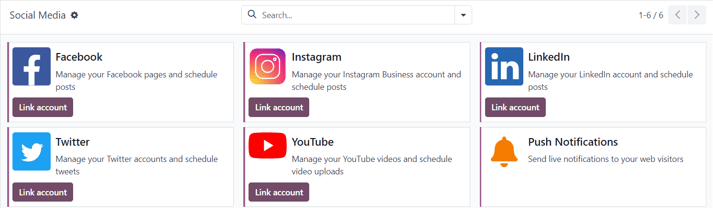
เพจบัญชีโซเชียล
ในการดูรายการบัญชีโซเชียลและเว็บไซต์ทั้งหมดที่เชื่อมโยงกับฐานข้อมูล ให้ไปที่:menuselection:Social Marketing app --> Configuration --> Social Accounts หน้า:guilabel:Social Accounts`นี้แสดง:guilabel:`Name, Handle/Short Name, แพลตฟอร์ม:guilabel:Social Media, ผู้ที่:guilabel:Created by และ:guilabel:`Company`ที่เกี่ยวข้อง
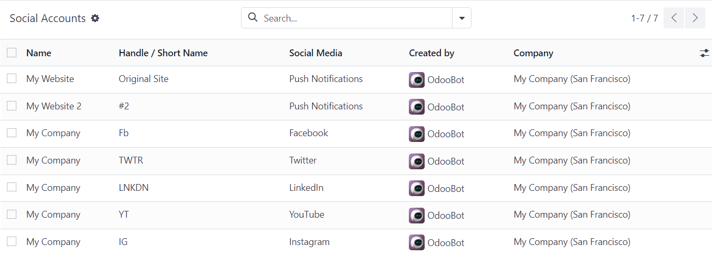
ในการแก้ไข/ปรับเปลี่ยนบัญชีโซเชียลใดๆ บนเพจนี้ เพียงเลือกบัญชีที่ต้องการจากรายการบนเพจนี้ และดำเนินการปรับเปลี่ยนที่จำเป็น
เพจสตรีมโซเชียล
ในการดูเพจแยกต่างหากพร้อมสตรีมโซเชียลมีเดียทั้งหมดที่ถูกเพิ่มไปยังแดชบอร์ด*การตลาดผ่านโซเชียล*หลัก ให้ไปที่:menuselection:Social Marketing app --> Configuration --> Social Streams
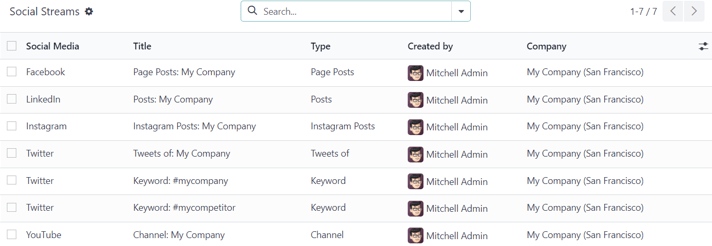
ที่นี่ ข้อมูลสตรีมโซเชียลจะถูกจัดระเบียบในรายการพร้อม:guilabel:Social Media, Title`ของสตรีม, :guilabel:`Type`ของสตรีม (เช่น :guilabel:`Posts, Keyword ฯลฯ), ผู้ที่:guilabel:Created by และ:guilabel:`Company`ที่เกี่ยวข้อง
ในการปรับเปลี่ยนข้อมูลของสตรีมใดๆ เพียงคลิกสตรีมที่ต้องการจากรายการ และดำเนินการปรับเปลี่ยนที่จำเป็น
ผู้เยี่ยมชม
ในการดูภาพรวมที่สมบูรณ์ของผู้เยี่ยมชมเว็บไซต์ทั้งหมดที่เชื่อมต่อกับฐานข้อมูล ให้ไปที่:menuselection:Social Marketing app --> Visitors
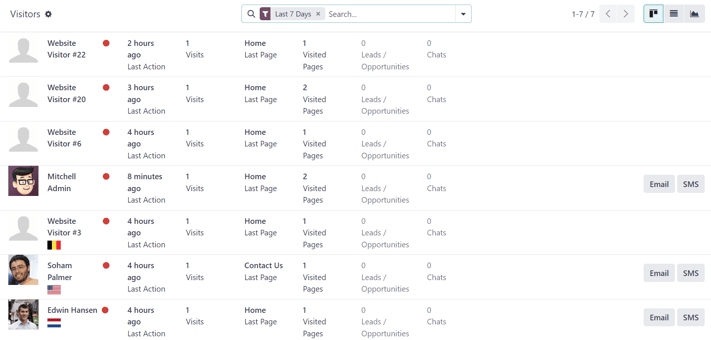
Here, NightPOS provides a detailed layout of all the visitors' pertinent information in a default kanban view. If visitors already have contact information in the database, the option to send them an Email and/or an SMS is available.
ข้อมูลผู้เยี่ยมชมเดียวกันนี้สามารถดูเป็นรายการหรือกราฟได้ ตัวเลือกมุมมองเหล่านั้นอยู่ที่มุมขวาบนของเพจ:guilabel:Visitors
การตลาดโซเชียล
NightPOS's Social Marketing application helps content marketers create and schedule posts, manage various social media accounts, analyze content effectiveness, and engage directly with social media followers in one, centralized location.
ดูเพิ่มเติม
NightPOS Tutorials: Marketing
โพสต์โซเชียล
Discover everything there is to know about how to create and customize social media posts using NightPOS.
แคมเปญโซเชียล
เรียนรู้เกี่ยวกับเครื่องมือแคมเปญและการตลาดต่างๆ ที่แอปพลิเคชันนี้นำเสนอ