การตั้งชื่อบาร์โค้ด GS1
GS1 nomenclature consolidates various product and supply chain data into a single barcode. NightPOS takes in unique Global Trade Item Numbers (GTIN), purchased by businesses, to enable global shipping, sales, and eCommerce product listing.
กำหนดค่าการตั้งชื่อ GS1 เพื่อสแกนบาร์โค้ดของกล่องที่ปิดผนึกและระบุข้อมูลผลิตภัณฑ์ที่จำเป็น เช่น GTIN, หมายเลขล็อต, ข้อมูลปริมาณ และอื่นๆ
Important
GTIN คือรหัสระบุผลิตภัณฑ์เฉพาะที่ ต้อง ``ซื้อจาก GS1 <https://www.gs1.org/standards/get-barcodes>`_ เพื่อใช้บาร์โค้ด GS1
ตั้งค่าการตั้งชื่อบาร์โค้ด
หากต้องการใช้การตั้งชื่อ GS1 ให้ไปที่ จากนั้นภายใต้ส่วน บาร์โค้ด ให้ทำเครื่องหมายที่ช่อง เครื่องสแกนบาร์โค้ด จากนั้นเลือก จากตัวเลือกการตั้งชื่อบาร์โค้ดเริ่มต้น
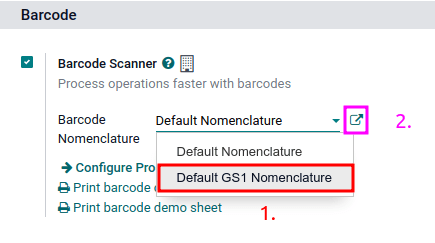
The list of GS1 rules and barcode patterns NightPOS supports by default is accessible by clicking the ➡️ (arrow) icon to the right of the Barcode Nomenclature selection.
In the Open: Nomenclature pop-up table, view and edit the GS1 Rule Names available in NightPOS. The table contains all the information that can be condensed with a GS1 barcode, along with the corresponding Barcode Pattern.
Tip
หลังจากตั้งค่า GS1 ให้เป็นชื่อบาร์โค้ดแล้ว การตั้งค่า ยังสามารถเข้าถึงได้จากเมนูที่ซ่อนอยู่ซึ่งค้นพบได้หลังจากเปิดใช้งาน โหมดนักพัฒนา เมื่อเปิดใช้งานแล้ว ให้ไปที่เมนู และสุดท้าย เลือก การตั้งชื่อ GS1 แบบเริ่มต้น
Use GS1 barcodes in NightPOS
For product identification using GS1 barcodes in NightPOS, businesses obtain a unique GTIN as an internationally distinct product identifier purchased from GS1. This GTIN is combined with specific product details following GS1's designated barcode pattern. The barcode pattern's arrangement of numbers and letters must adhere to GS1 conventions for accurate interpretation by global systems along the supply chain.
Every barcode starts with a 2-4 digit application identifier (A.I.). This required prefix universally indicates what kind of information the barcode contains. NightPOS follows GS1 rules for identifying information, as detailed in the default GS1 rules list. Including the relevant A.I. from the list enables NightPOS to correctly interpret GS1 barcodes. While most barcode patterns have a fixed length requirement, certain ones, such as lots and serial numbers, have flexible length.
Tip
สำหรับรูปแบบบาร์โค้ดที่มีความยาวยืดหยุ่นซึ่งไม่ได้วางไว้ที่ส่วนท้ายของบาร์โค้ด GS1 ให้ใช้ตัวคั่น FNC1 (\x1D) เพื่อสิ้นสุดการใช้งานบาร์โค้ด
ตัวอย่าง: รูปแบบบาร์โค้ดสำหรับหมายเลขล็อตมีความยาว 20 ตัวอักษร แทนที่จะสร้างบาร์โค้ดหมายเลขล็อตที่มี 20 ตัวอักษร เช่น LOT00000000000000001 ให้ใช้ตัวคั่น FNC1 เพื่อให้สั้นลง: LOT001x1D
โปรดดูที่ รายการระบบการตั้งชื่อ GS1 เพื่อดูรายการรูปแบบบาร์โค้ดและกฎเกณฑ์ทั้งหมดที่ต้องปฏิบัติตาม หรือดู เอกสารการใช้งาน GS1 นี้ สำหรับตัวอย่างเฉพาะของการรวม GTIN กับข้อมูลผลิตภัณฑ์และการกำหนดค่าขั้นตอนการทำงาน
สร้างกฎเกณฑ์
GS1 rules are a specific format of information contained in the barcode, beginning with an A.I. and containing a defined length of characters. Scanning GS1 barcodes from the default GS1 list auto-fills corresponding data in the NightPOS database.
Adding GS1 barcode rules in NightPOS ensures accurate interpretation of unique, non-standard GS1 formats.
ในการดำเนินการดังกล่าว ให้เริ่มด้วยการเปิดใช้งาน โหมดนักพัฒนา และไปที่รายการ การตั้งชื่อบาร์โค้ด ใน จากนั้นเลือกรายการ การตั้งชื่อ GS1 แบบเริ่มต้น
On the Default GS1 Nomenclature page, select Add a line at the bottom of the table, which opens a window to create a new rule. The Rule Name field is used internally to identify what the barcode represents. The barcode Types are different classifications of information that can be understood by the system (e.g. product, quantity, best before date, package, coupon). The Sequence represents the priority of the rule; this means the smaller the value, the higher the rule appears on the table. NightPOS follows the sequential order of this table and will use the first rule it matches based on the sequence. The Barcode Pattern is how the sequence of letters or numbers is recognized by the system to contain information about the product.
หลังจากกรอกข้อมูลแล้ว ให้คลิกปุ่ม บันทึกและสร้าง เพื่อสร้างกฎใหม่ หรือคลิก บันทึกและปิด เพื่อบันทึกและกลับไปยังตารางกฎ
การแก้ไขปัญหาบาร์โค้ด
เนื่องจากบาร์โค้ด GS1 ใช้งานยาก ต่อไปนี้คือการตรวจสอบที่ควรลองเมื่อบาร์โค้ดไม่ทำงานตามที่คาดหวัง:
ตรวจสอบให้แน่ใจว่าการตั้งค่า การตั้งชื่อบาร์โค้ด ถูกตั้งเป็น ไปที่ส่วน การตั้งค่าการตั้งชื่อ เพื่อดูรายละเอียดเพิ่มเติม
Ensure that the fields scanned in the barcode are enabled in NightPOS. For example, to scan a barcode containing lots and serial numbers, make sure the Lots & Serial Numbers feature is enabled in NightPOS's settings and on the product.
ละเว้นเครื่องหมายวรรคตอน เช่น วงเล็บ
()หรือวงเล็บเหลี่ยม[]ระหว่าง A.I. และลำดับบาร์โค้ด เครื่องหมายวรรคตอนเหล่านี้มักใช้ในตัวอย่างเพื่อให้อ่านง่าย และ ไม่ควรรวม เครื่องหมายวรรคตอนเหล่านี้ไว้ในบาร์โค้ดขั้นสุดท้าย สำหรับรายละเอียดเพิ่มเติมเกี่ยวกับการสร้างบาร์โค้ด GS1 โปรดไปที่ หัวข้อนี้When a single barcode contains multiple encoded fields, NightPOS requires all rules to be listed in the barcode nomenclature for NightPOS to read the barcode. This section details how to add new rules in the barcode nomenclature.
ทดสอบบาร์โค้ดที่มีฟิลด์เข้ารหัสหลายรายการทีละรายการ เพื่อหาว่าฟิลด์ใดที่ทำให้เกิดปัญหา
Example
เมื่อทำการทดสอบบาร์โค้ดที่มี GTIN หมายเลขล็อต และปริมาณ ให้เริ่มต้นด้วยการสแกน GTIN เพียงอย่างเดียว จากนั้นทดสอบ GTIN ด้วยหมายเลขล็อต และสุดท้ายลองสแกนบาร์โค้ดทั้งหมด
After diagnosing the encoded field is unknown, add new rules to NightPOS's default list to recognize GS1 barcodes with unique specifications.
Important
While the new field will be read, the information won't link to an existing field in NightPOS without developer customizations. However, adding new rules is necessary to ensure the rest of the fields in the barcode are interpreted correctly.
รายการระบบการตั้งชื่อ GS1
The table below contains NightPOS's default list of GS1 rules. Barcode patterns are written in regular expressions. Only the first three rules require a check digit as the final character.