
สเปน
โมดูล
The following modules are installed automatically with the Spanish localization:
ชื่อ |
ชื่อทางเทคนิค |
คำอธิบาย |
|---|---|---|
Spain - Accounting (PGCE 2008) |
|
Spanish fiscal localization package, complete with the Spanish chart of accounts, taxes, tax report, and fiscal positions. |
Spain - Accounting (PGCE 2008) Reports |
|
Accounting reports for Spain. |
Spain - Accounting Reports (2024 Update) |
|
Adds extra fields regarding Rectificación for Modelo 303. |
Spain - Accounting Reports (2025 Update) |
|
Adds tax return functionalities. |
Spain - Facturae EDI |
|
Creates EDI Facturae files required to send to AGE (Administración General del Estado). |
Spain - Intrastat Declaration |
|
Adds Interstat report. |
Additionally, the following modules must be manually installed:
ชื่อ |
ชื่อทางเทคนิค |
คำอธิบาย |
|---|---|---|
Spain - Point of Sale + TicketBAI |
|
Sends invoices to the Diputaciones Forales of Araba/Álava, Bizkaia and Gipuzkoa. |
Spain - SII EDI Suministro de Libros |
|
Sends taxes information to SII (Suministro Inmediato de Información). |
Spain - TicketBAI |
|
Sends invoices and vendor bills to the Diputaciones Forales of Araba/Álava, Bizkaia and Gipuzkoa. |
Spain - Veri*Factu |
|
Sends Veri*Factu XML to AEAT (Agencia Estatal de Administración Tributaria). |
Spain - Veri*Factu for Point of Sale |
|
Adds Veri*Factu support to Point of Sale. |
Note
In some cases, such as when upgrading to a version with additional modules, it is possible that modules may not be installed automatically. Any missing modules can be manually installed.
ภาพรวมการปรับแต่งตามท้องถิ่น
The Spanish localization package ensures compliance with Spanish fiscal and accounting regulations. It includes tools for managing taxes, fiscal positions, reporting, and a predefined chart of accounts tailored to Spain’s standards.
The Spanish localization package provides the following key features:
Chart of accounts: a predefined structure tailored to Spanish accounting standards.
Taxes pre-configured tax rates, including standard VAT, zero-rated, and exempt options.
Fiscal positions: automated tax adjustments based on customer or supplier registration status.
Note
There are several distinct Spanish fiscal localization packages available, each featuring its own pre-configured PGCE (Plan General de Contabilidad) chart of accounts:
Spain - SMEs (2008)
Spain - Non-profit entities (2008)
Spain - Cooperatives - Complete (2008)
Spain - Cooperatives - SMEs (2008)
Spain - Complete (2008)
New NightPOS Online databases created with Spain as the selected country are set up by default with the Spain - SMEs (2008) fiscal localization package.
รายงาน
The Spanish-specific statement reports available are:
งบดุล
Profit & Loss (ES)
รายการขาย EC
รายงานภาษี
To access Spain-specific tax reports (Modelo), go to , click Report: and select one of the following:
Tax Report (Mod 111)(ES)
Tax Report (Mod 115)(ES)
Tax Report (Mod 303)(ES)
Tax Report (Mod 347)(ES)
Tax Report (Mod 349)(ES)
Tax Report (Mod 390)(ES)
Tip
To export the VAT records books (Libros de IVA) in XLSX format, click Report: and select Generic Tax report. Then, click the (down arrow) and select VAT Records Books (XLSX) to generate the XLSX file.
Modelo 130
การเปลี่ยนแปลงเปอร์เซ็นต์
หากคุณต้องการเปลี่ยนการคำนวณเปอร์เซ็นต์ของกล่อง [04] ภายใต้ส่วน I และ/หรือของกล่อง [09] ภายใต้ส่วน II:
เปิดใช้งาน โหมดนักพัฒนา ไปที่ และเลือกรายงาน รายงานภาษี (Modelo 130)
คลิกไอคอน (cogs) ทางด้านขวาของ รายงาน : รายงานภาษี (Mod 130) (ES)
คลิกกล่องที่คุณต้องการเปลี่ยนแปลง จากนั้นในหน้าต่างป๊อปอัป ให้คลิกที่บรรทัด เปอร์เซ็นต์ ในหน้าต่างป๊อปอัปใหม่ ให้เปลี่ยนค่าในฟิลด์ สูตร เป็นเปอร์เซ็นต์ที่คุณต้องการใช้ ทำซ้ำขั้นตอนนี้หากคุณต้องการปรับเปลี่ยนกล่องอื่นด้วย
รายงานกิจกรรมการเกษตร
หากคุณต้องการให้ใส่จำนวนในส่วน II (จากกล่อง [08] ถึง [11]) คุณต้องเปลี่ยน อุตสาหกรรม ของผู้ติดต่อที่เกี่ยวข้องเป็น เกษตรกรรม:
ไปที่แบบฟอร์มติดต่อ (เช่น หรือ ) และเลือกผู้ติดต่อ
ในแท็บ การขายและการจัดซื้อ ให้ตั้งค่าฟิลด์ อุตสาหกรรม เป็น การเกษตร
ทำซ้ำการดำเนินการนี้สำหรับการติดต่อทั้งหมดที่เกี่ยวข้องกับอุตสาหกรรม เกษตรกรรม
Veri*Factu
Note
Producers of Veri*Factu billing systems must self-certify their compliance with the regulations.
Download NightPOS's "declaración responsable"
Veri*Factu is the Spanish Tax Agency's verifiable invoice issuance system. It is mandatory for most taxpayers in Spain, except for those who use the SII system or are under a regional tax regime (i.e., TicketBai).
NightPOS allows invoices and Point of Sale orders to be automatically sent to the tax authorities.
การกำหนดค่า
ในการเปิดใช้งาน Veri*Factu ให้ทำตามขั้นตอนเหล่านี้:
เปิดแอปการตั้งค่าเพื่อตรวจสอบให้แน่ใจว่า:guilabel:
ประเทศ`และ:guilabel:`Tax ID`ของบริษัทของคุณถูกตั้งค่าอย่างถูกต้องในส่วน:ref:`บริษัท <general/companies/company>Install the Spain - Veri*Factu (
l10n_es_edi_verifactu) module.Go to or , scroll to the Veri*Factu section, check the Enable Veri*Factu option, and click Manage certificates to add a certificate.
ในมุมมองรายการ:guilabel:
ใบรับรองสำหรับ Veri*Factuคลิก:guilabel:สร้างคลิก:guilabel:
อัปโหลดไฟล์ของคุณจากนั้นเลือกไฟล์ใบรับรองและใส่:guilabel:`รหัสผ่าน`ที่จำเป็นในการเปิดใบรับรอง (หากมี)
Note
ต้องอัปโหลดใบรับรองอย่างน้อยหนึ่งใบ
By default, Veri*Factu is in testing mode. The data is sent to test servers and is not considered official. When official data can be sent to the production servers, go to the Veri*Factu section in the Settings and disable Test Environment.
การแจ้งหนี้
เมื่อ:doc:ใบแจ้งหนี้ <../../finance/accounting/customer_invoices>`ได้รับการยืนยันแล้ว จะสามารถ:ref:`ส่ง <accounting/invoice/sending>`ได้ ในหน้าต่าง:guilabel:`ส่ง ตัวเลือก Veri*Factu จะพร้อมใช้งานหาก Veri*Factu ได้รับการเปิดใช้งานแล้ว
คลิก:guilabel:ส่ง`เพื่อสร้างไฟล์ JSON ที่มีรายละเอียดใบแจ้งหนี้ ไฟล์นี้จะถูกจัดเก็บเป็นเอกสาร Veri*Factu ในแท็บ:guilabel:`Veri*Factu เอกสารที่เกี่ยวข้องทั้งหมดจะแสดงรายการตามวันที่สร้างและสถานะปัจจุบัน
Tip
ในการดาวน์โหลดไฟล์ JSON ให้คลิกที่เอกสารนั้นในแท็บ:guilabel:Veri*Factu จากนั้นในหน้าต่าง:guilabel:เปิด: เอกสาร Veri*Factu ให้คลิกลิงก์ในฟิลด์:guilabel:JSON
Note
เอกสารควรถูกส่งไปยัง:abbr:
AEAT (Agencia Estatal de Administración Tributaria)`ทันที อย่างไรก็ตาม อาจมีความล่าช้าเนื่องจากระยะเวลารอที่บังคับใช้ระหว่างการส่งที่กำหนดโดย:abbr:`AEAT (Agencia Estatal de Administración Tributaria)ในกรณีเช่นนี้ เอกสารจะถูกส่งโดยอัตโนมัติในครั้งถัดไปที่การดำเนินการตามกำหนดเวลาทำงานรหัส QR ของ Veri*Factu จะปรากฏบน PDF ของใบแจ้งหนี้ สแกนรหัสนี้เพื่อตรวจสอบว่าใบแจ้งหนี้ได้รับและรับทราบโดย:abbr:
AEAT (Agencia Estatal de Administración Tributaria)
คำสั่งซื้อการขายหน้าร้าน
เมื่อคำสั่งซื้อได้รับการ:ref:`ชำระเงิน <pos/use/sell>`แล้ว ไฟล์ JSON ที่มีรายละเอียดคำสั่งซื้อจะถูกสร้างขึ้น ไฟล์นี้จะถูกจัดเก็บเป็นเอกสาร Veri*Factu
ไปที่:menuselection:การขายหน้าร้าน --> คำสั่งซื้อ --> คำสั่งซื้อ ในมุมมองรายการ:guilabel:คำสั่งซื้อ เลือกคำสั่งซื้อที่เกี่ยวข้อง ในแท็บ:guilabel:Veri*Factu เอกสารที่เกี่ยวข้องทั้งหมดจะแสดงรายการตามวันที่สร้างและสถานะปัจจุบัน
Tip
ในการดาวน์โหลดไฟล์ JSON ให้คลิกที่เอกสารนั้นในแท็บ:guilabel:Veri*Factu จากนั้นในหน้าต่าง:guilabel:เปิด: เอกสาร Veri*Factu ให้คลิกลิงก์ในฟิลด์:guilabel:JSON
Note
เอกสารควรถูกส่งไปยัง:abbr:
AEAT (Agencia Estatal de Administración Tributaria)`ทันที อย่างไรก็ตาม อาจมีความล่าช้าเนื่องจากระยะเวลารอที่บังคับใช้ระหว่างการส่งที่กำหนดโดย:abbr:`AEAT (Agencia Estatal de Administración Tributaria)ในกรณีเช่นนี้ เอกสารจะถูกส่งโดยอัตโนมัติในครั้งถัดไปที่การดำเนินการตามกำหนดเวลาทำงาน
หากมีการสร้างใบแจ้งหนี้สำหรับคำสั่งซื้อระหว่างกระบวนการชำระเงิน เอกสาร Veri*Factu จะถูก:ref:`สร้างและส่งสำหรับใบแจ้งหนี้ <localizations/spain/veri-factu-invoices>`แทน
Note
รหัส QR ของ Veri*Factu จะปรากฏบนใบเสร็จรับเงินของคำสั่งซื้อ แม้ว่าจะมีการสร้างใบแจ้งหนี้สำหรับคำสั่งซื้อก็ตาม สแกนรหัสนี้เพื่อตรวจสอบว่าใบแจ้งหนี้ได้รับและรับทราบโดย:abbr:AEAT (Agencia Estatal de Administración Tributaria)
TicketBAI
Ticket BAI or TBAI is an e-Invoicing system used by the Basque government and its three provincial councils (Álava, Biscay, and Gipuzkoa). NightPOS supports the TicketBAI (TBAI) electronic invoicing format for all three regions of the Basque Country.
Note
To use TicketBAI, make sure:
Country and Tax ID fields on the company record are filled in.
Spain -TicketBAI (
l10n_es_edi_TBAI) module is installed.
To configure TicketBAI, follow these steps:
Go to and scroll down to the Spain Localization section.
In the Registro de Libros connection TicketBAI section, select a region in the Tax Agency for TBAI field and Save.
Click Manage certificates (TicketBAI).
In the Certificates for EDI TicketBAI invoices on Spain view, click New.
Click Upload your file to upload the certificate, enter the Certificate Password provided by the tax agency, and select TBAI in the Certificate scope field.
Warning
To test certificates, go to and, in the Spain Localization section, enable TBAI Test Mode.
กรณีการใช้งาน
Once an invoice is created and confirmed, follow these steps:
คลิก Send
In the Print & Send window, make sure the TicketBAI option is enabled and click Send
In the TicketBAI invoice tab, the TicketBAI status is updated to Sent, and the XML file is available in the TicketBAI Post File field.
Note
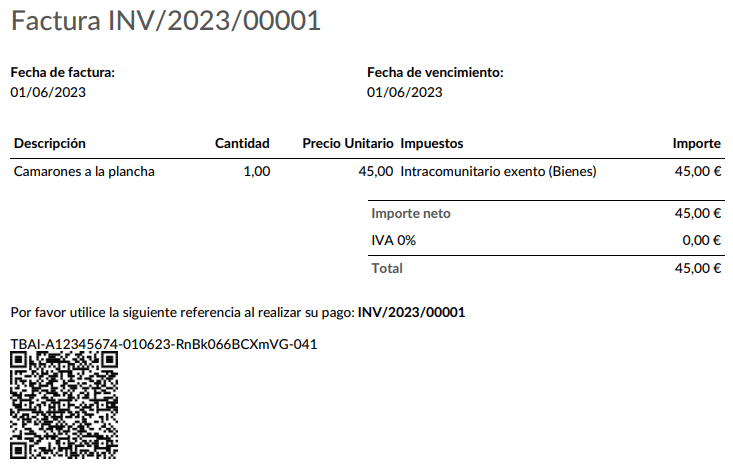
TBAI รหัส QR โค้ด จะแสดงอยู่ในใบแจ้งหนี้ PDF
FACe
Note
Make sure the Spain - Facturae EDI (l10n_es_edi_facturae) module is installed.
FACe เป็นแพลตฟอร์ม e-Invoicing ที่ใช้โดยหน่วยงานภาครัฐในประเทศสเปนเพื่อส่งใบแจ้งหนี้ทางอิเล็กทรอนิกส์
ในการกำหนดค่า FACe ให้ทำตามขั้นตอนเหล่านี้:
Go to or , and select Certificates in the Spain Facturae EDI section.
คลิก สร้างใหม่ เพื่อสร้างใบรับรองใหม่
Click Upload your file to upload the certificate, enter the Certificate Password provided by the tax agency, and select Facturae in the Certificate scope field.
กรณีการใช้งาน
Once an invoice is created and confirmed, follow these steps:
Make sure the customer has a valid VAT number and that their country is set to
Spain.คลิก Send
In the Print & Send window, make sure the Factura-e option is enabled and click Send.
The generated XML file, available in the chatter, must then be sent manually.
Warning
The XML file is NOT sent automatically.
Tip
FACe XML files can be sent in batch through the governmental portal.
ศูนย์บริหาร
For FACe to work with administrative centers, the invoice must include specific data about the centers.
Note
Make sure the Spain - Facturae EDI (l10n_es_edi_facturae) module is
installed.
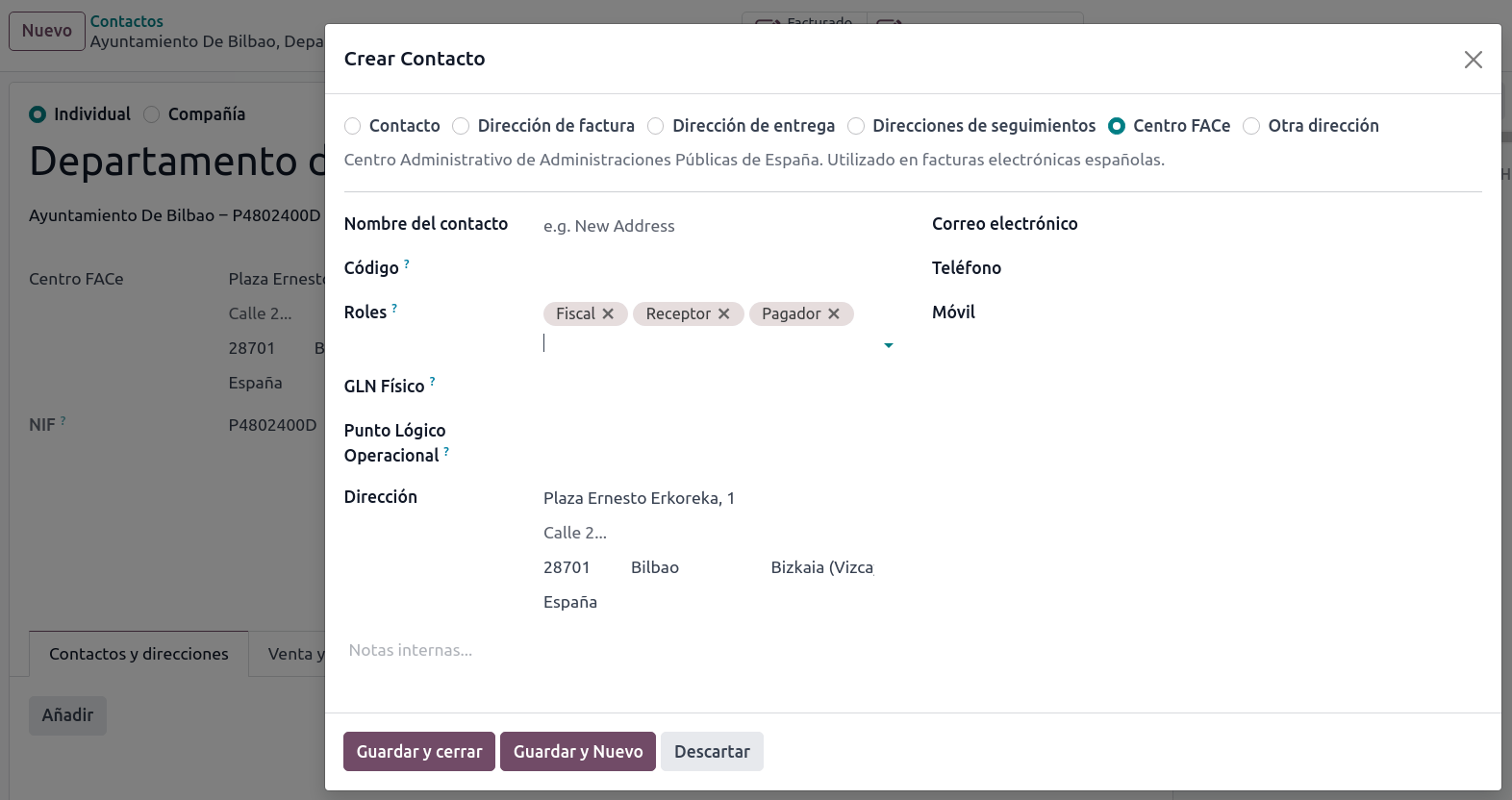
To add administrative centers, create a new contact for the partner company. Select FACe Center as the type, assign one or more role(s) to that contact, and Save. The three roles usually required are:
Órgano gestor: Receptor (Receiver);
Unidad tramitadora: Pagador (Payer);
Oficina contable: Fiscal (Fiscal).
Tip
If administrative centers need different Codes per role, different centers must be created for each role.
When an electronic invoice is created with a partner that has administrative centers, all administrative centers are included in the invoice.
A contact can hold multiple roles, or multiple contacts can each have different roles.