การจ้างเหมาช่วงเบื้องต้น
In basic subcontracting, a company's product is produced entirely by a subcontractor. The product is first purchased from the subcontractor, who acquires their own components, manufactures the final product, then delivers the final product to the company's warehouse.
The following document covers how to configure a subcontracted product and trigger the subcontracting process.
Note
This document uses the term company to refer to the internal company requiring subcontracted goods and the term subcontractor to refer to the external vendor handling the outsourced production of the subcontracted goods.
การกำหนดค่า
To use subcontracting, a company must first configure products with a vendor pricelist as well as a subcontracting-type BoM.
The pricelist allows the company to purchase the product from the vendor (subcontractor) through a PO, while the BoM allows the product to be manufactured externally by the subcontractor.
ตั้งค่าผู้จำหน่ายสินค้า
ในการตั้งค่าผู้จำหน่ายของสินค้าสำหรับการรับช่วงการผลิตพื้นฐาน ให้ไปที่:menuselection:แอปคลังสินค้า --> สินค้า --> สินค้า จากนั้นเลือกสินค้าหรือสร้างสินค้าใหม่
On the product form, click the Purchase tab and add the product's subcontractor as a vendor by clicking Add a line. Select the subcontractor using the Vendor drop-down menu.
Then, enter the price of the product in the Unit Price field.
Finally, set a Lead Time for the product in the corresponding field to specify the number of days for the subcontractor to produce and deliver the final product.
Note
Since companies are only responsible for purchasing and receiving the final product, they do not need to additionally configure manufacturing lead times on a BoM. Instead, provide only a single Lead Time on the vendor pricelist that factors in both the subcontractor's manufacturing and delivery time.
กำหนดค่า BoM
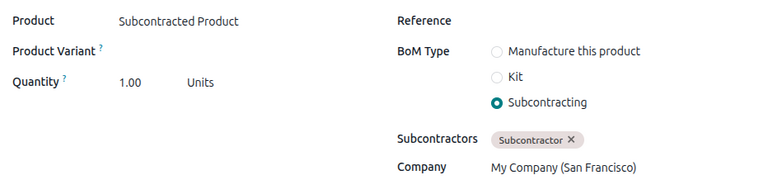
After specifying the vendor, configure a subcontracting-type BoM for the product. Click the Bill of Materials smart button on the product form. Then, select the desired BoM or create a new one.
Tip
หรือไปที่ และเลือก BoM สำหรับสินค้าที่จ้างเหมาช่วง
ในฟิลด์:guilabel:ประเภท BoM ให้เลือก:guilabel:การรับช่วงการผลิต ในฟิลด์:guilabel:`ผู้รับเหมาช่วง`ที่แสดงขึ้น ให้เพิ่มผู้รับเหมาช่วงหนึ่งรายหรือมากกว่า
Because the components and manufacturing are both handled by the subcontractor, there is no need to list any components in the Components tab of the BoM.
ขั้นตอนการจ้างเหมาช่วงเบื้องต้น
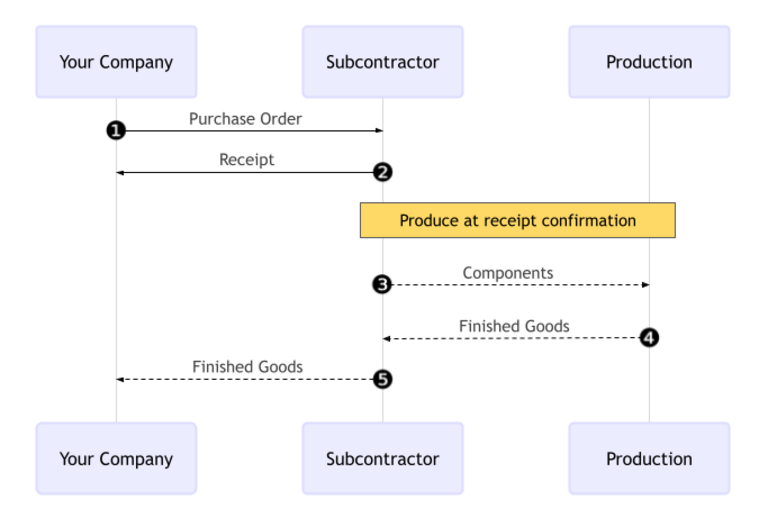
ขั้นตอนการรับช่วงการผลิตพื้นฐานเริ่มต้นด้วย:ref:`การสร้างใบสั่งซื้อ <subcontracting_basic/workflow/create_po>`เพื่อจัดซื้อสินค้าจากผู้รับเหมาช่วง (1)
The company then confirms the PO, which creates a receipt to transfer the final product (2). The subcontractor manufactures the product and delivers it back to the company when done.
Once the product has been produced and received, the company validates the receipt (5) to trigger inventory moves from the subcontractor to the company's stock (3, 4).
สร้างและยืนยันใบสั่งซื้อ
ในการสร้าง|PO|สำหรับสินค้าที่รับช่วงการผลิต ให้ไปที่:menuselection:แอปการจัดซื้อ --> คำสั่งซื้อ --> ใบสั่งซื้อ และคลิก:guilabel:สร้าง
เริ่มกรอก|PO|โดยเลือกผู้รับเหมาช่วงจากเมนูแบบเลื่อนลง:guilabel:ผู้จำหน่าย ในแท็บ:guilabel:สินค้า ให้คลิก:guilabel:เพิ่มสินค้า`เพื่อสร้างรายการสินค้าใหม่ เลือกสินค้าที่รับช่วงการผลิตในฟิลด์:guilabel:`สินค้า และป้อนจำนวนในฟิลด์:guilabel:จำนวน
After adding the product, the Expected Arrival field is updated with the finished product's expected delivery date, as configured earlier with the vendor's Lead Time.
สุดท้าย คลิก ยืนยันคำสั่งซื้อ เพื่อยืนยัน PO ใบรับสินค้าจะถูกสร้างขึ้นโดยอัตโนมัติ และปุ่มอัจฉริยะ ใบรับสินค้า จะปรากฏที่ด้านบนของแบบฟอร์ม
ขั้นตอนการได้รับเอกสาร
After the order is confirmed, the subcontractor manufactures the product and delivers the finished good back to the company.
To receive the finished product from the subcontractor, click the Receive button on the PO, or click the Receipt smart button at the top of the page. Then, click Validate to enter the incoming shipment into inventory.
Note
หากเปิดใช้งาน ขั้นตอนการจัดการคลังสินค้าแบบหลายขั้นตอน จะต้องมีการตรวจสอบการโอนย้ายเพิ่มเติมเพื่อบันทึกสินค้าเข้าสู่คลัง
ติดตามการเคลื่อนไหวสินค้าในคลัง
After validating a receipt, NightPOS automatically generates inventory moves to track the movement of subcontracted products between locations. To view these inventory moves, navigate to .
To track inventory movement in subcontracting, NightPOS sends any product components to a dedicated location called Subcontracting. Another location called Production then consumes the components and produces the finished good. Once produced, the good then moves back to the Subcontracting location before finally entering the company's stock when the receipt is validated.

Note
Because no components are sent in basic subcontracting, there is no movement from the Subcontracting location to the Production location.